Step 1: Authenticate
Please follow the instructions below to input identification information:
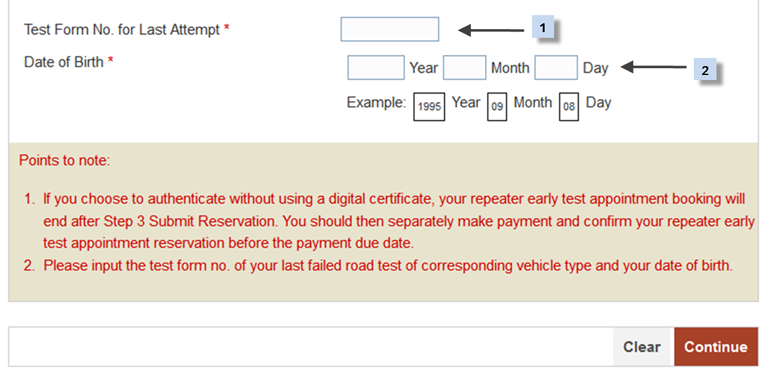
- Enter "Test Form No. for Last Attempt".
- Enter "Date of Birth".
After completion of this screen:
- Press "Continue" button to go to next screen. or
- Press "Clear" button to clear and re-enter the data.
After clicking "Continue" button, the following screen will be displayed:
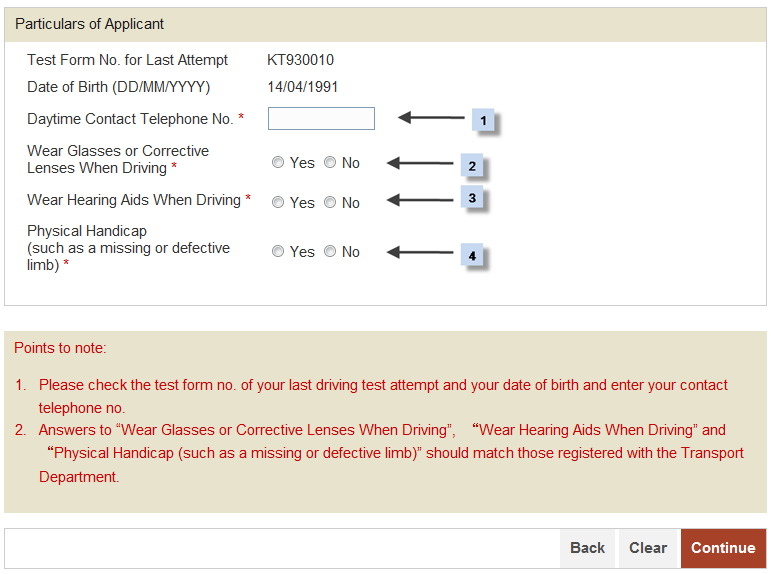
- Enter in "Daytime Contact Telephone No.".
- Make a selection for "Wear Glasses or Corrective Lenses When Driving".
- Make a selection for "Wear Hearing Aids When Driving".
- Make a selection for "Physical Handicap (such as a missing or defective limb)".
After completion of this screen:
- Press "Continue" button to go to next screen. or
- Press "Clear" button to clear and re-enter the data. or
- Press "Back" button to go to previous screen.